MetaTrader 5 · Expert Advisor
KenKem Expert AdvisorUser Guide
A practical, plain-language guide to running the KenKem Expert Advisor on MetaTrader 5 — a fully-automated, multi-engine trend EA for Gold & Crypto (mainly BTC). It is the automated counterpart to the KenKem TradingView indicator: tuned out of the box, with a deliberately small set of controls so you manage risk while the EA runs the strategy. The defaults ship tuned to the validated flagship configuration — XAUUSD on M1 — so you can attach it and go.
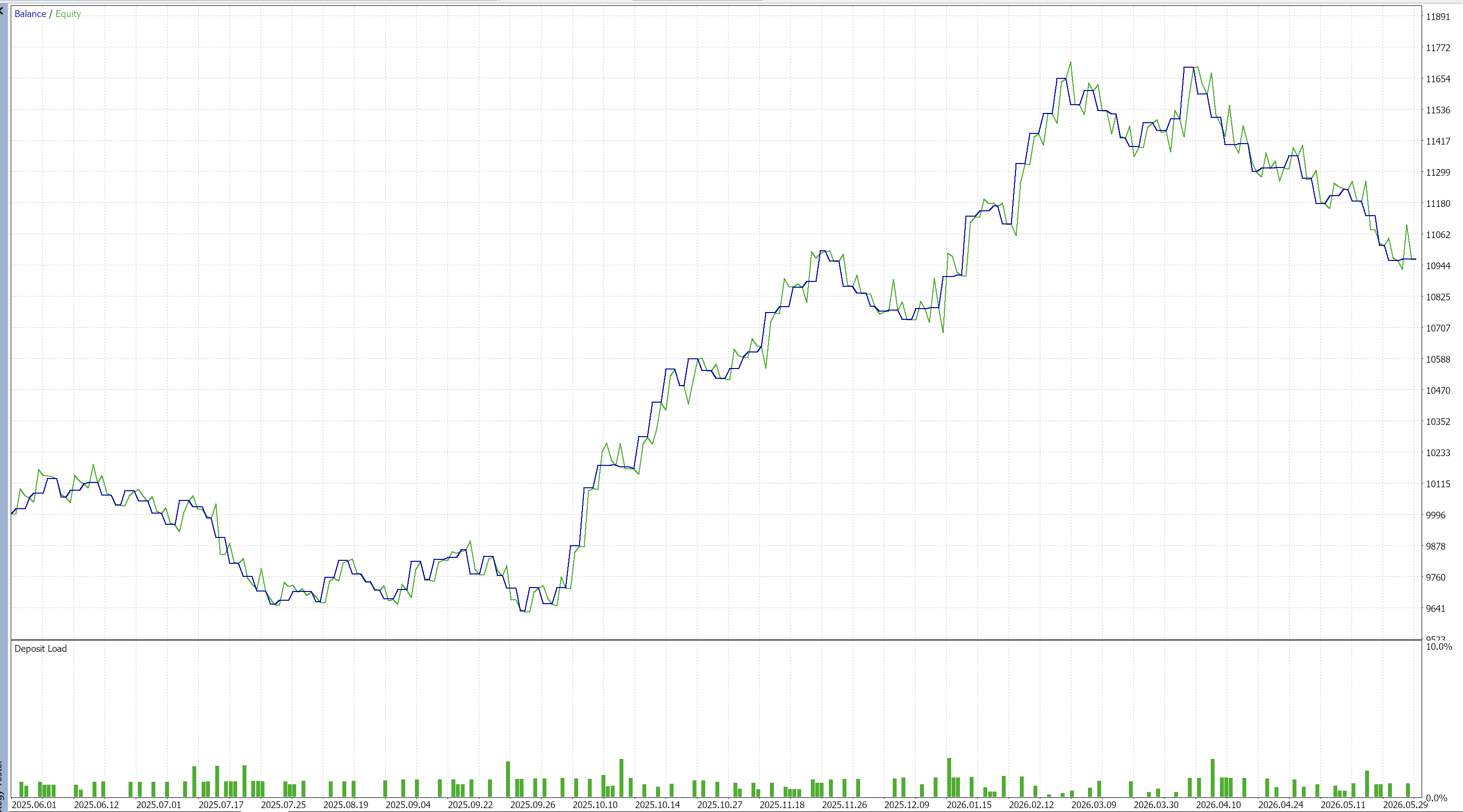
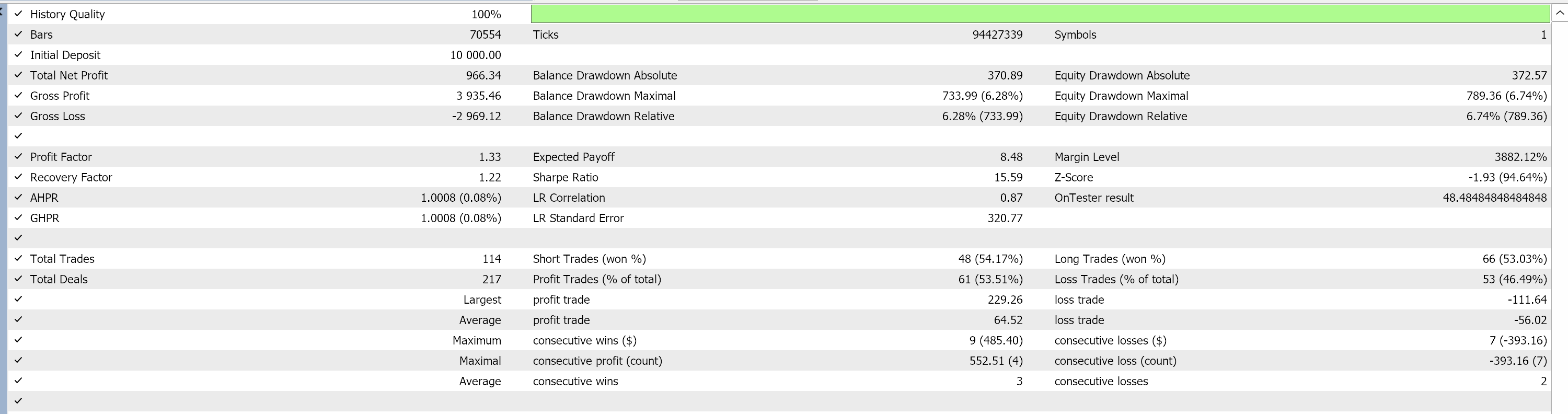
🧪Reference backtest
The charts below are a reference backtest. We configured the EA with risk per trade = 1% and maximum daily drawdown = 5%, then ran it with 100% real ticks on Exness to produce these results.
🤖What it is
The KenKem EA doesn't rely on a single signal. It runs two complementary trend engines side by side, backed by a strict quality filter and a serious risk manager:
- Trend continuation — detects a fresh, healthy trend and rides it, letting winners run.
- Pullback — waits for price to pull back to value inside an established trend, then joins in the trend direction.
It reads the trend across multiple timeframes, waits for a high-quality setup, enters, places a measured stop, banks a partial, moves to break-even, and trails the runner. Both engines share the same risk and trade management.
The strategy's technical engine — the moving averages, momentum filters, volatility bands, stop logic and exit ladders — is pre-tuned and locked inside the EA. There are no edge-defining knobs to curve-fit; you control the part that should be yours (which engines to run, risk, drawdown limits, reward, trade frequency, and news/time avoidance).
What it is not: not a guaranteed-income system, not "set and forget," and no martingale, no grid, no averaging into losers — and no hidden recovery scheme that risks the account to mask a losing streak. It is a rule-based tool that does exactly what its settings say. For the manual side of the same engine, see the TradingView Indicator Guide.
📊What it trades
| Flagship | XAUUSD (Gold), M1 — the configuration the defaults are tuned to |
| Style | Multi-engine, trend-aligned scalping (continuation + pullback) |
| Confirmation | Multi-timeframe (M3 / M5 / M15 / H1) trend agreement |
| Account type | Hedging or netting; designed for ECN / low-spread accounts |
Quality over quantity. Every setup is scored for trend strength and conviction, and filtered against multi-timeframe agreement, volatility and spread. Weak setups are simply skipped — so it can trade less than you expect, on purpose.
✅Before you start
- The defaults are a tested starting point, not a recommendation. The EA ships tuned to the validated XAUUSD M1 configuration. That is where our testing landed — not a claim about the future.
- Gold on M1 is the flagship setup. Treat other instruments or timeframes as something you need to validate.
- It trades a real account. Always run it on a demo account first, long enough to see it behave through different market conditions, before considering live capital.
- Costs matter enormously on M1 Gold. Spread, commission and slippage come straight out of every trade and directly affect a scalping strategy. Test on the account you actually intend to run.
⚙️Installing and attaching
- Copy
KK-KenKem.ex5into your MetaTrader 5MQL5/Experts/folder (or a subfolder you keep EAs in). - Restart MetaTrader 5, or right-click the Navigator → Expert Advisors list and choose Refresh.
- Open an XAUUSD, M1 chart.
- Drag KenKem Expert Advisor from the Navigator onto the chart, or double-click it.
- In the settings window, Common tab, tick Allow Algo Trading. In the Inputs tab you can keep the defaults to start, or set your own parameters (especially your risk per trade) and click Save to store them in a
.setfile — see Make it yours below. - Make sure the global Algo Trading button in the MetaTrader toolbar is enabled. A small smiling face in the top-right of the chart means the EA is live.
To test before going live, open View → Strategy Tester, choose the EA, XAUUSD M1, your date range, and Every tick based on real ticks for the most realistic modelling, then run it. Backtest results are historical and do not guarantee future performance.
💾Make it yours — saving a .set file
You can run the KenKem EA on its default parameters straight away — attach it to XAUUSD M1 and it works. But the defaults are only a generic starting point, not a fit for your account. It is strongly recommended that you configure your own parameters — above all your risk per trade and your daily-loss / drawdown limits — so they match your balance and the loss you are genuinely comfortable taking. Once you have, save them to a .set file so you never have to type them again.
.set files as part of the software at the moment. The defaults are built into the EA; any .set file you use is one you create and save yourself, using the steps below.Save your settings to a .set file
- Open the EA settings — drag it onto the chart, or right-click the chart → Expert Advisors → Properties, or press F7.
- Go to the Inputs tab and adjust the values you care about — start with Risk per trade (%) and the account-protection limits.
- Click Save (bottom-right of the Inputs tab), choose a folder you'll remember, give the file a clear name (e.g.
MyKenKem-XAUUSD-M1.set), and save. Your settings are now stored locally on your own computer.
Load it next time
- Open the EA settings → Inputs tab.
- Click Load, pick your
.setfile, and click OK. Your saved parameters are applied in one step — no retyping.
Move it to another computer
A .set file is just a small text file. Copy it to a USB stick, a cloud drive, or email it to yourself, then on the other machine open the EA's Inputs tab, click Load and pick it — your personal configuration travels with you, identical to the original.
Whatever you load, re-read the disclaimer and demo-test before trusting it with real funds.
🔧The settings you control
The KenKem EA keeps the dialog short on purpose. The technical engine is pre-tuned and fixed; what you adjust is the part that should be yours.
Entry engines
- Enable E1 — Trend following — the core engine that detects and rides fresh trends.
- Enable E2 — Pull back — joins an established trend on a pullback to value.
Risk per trade
- Standard lot size — the baseline lot the sizing scales from.
- Risk per trade (%) — the fraction of balance put at risk on each trade. Choose a level you are comfortable losing on a single trade.
Reward (take-profit) levels
- E1 reward-to-risk — the profit target for the trend engine, as a multiple of the stop.
- E2 reward-to-risk — the same for the pullback engine.
Account protection / daily drawdown
- Max daily loss — pause new trades once the day's loss reaches this level.
- Drawdown slowdown — start reducing risk when overall drawdown reaches this level.
- Drawdown soft-block — at this drawdown, keep running but on micro lots.
- Profit protection — once the day is meaningfully green, reduce size to protect gains.
Trade frequency caps
- Max high-risk trades per session — cap on aggressive entries per session.
- Max SL/TP placements per session — cap on total trade placements per session.
- Max losses per session — block new entries after this many real losses in a session.
Times to avoid trading
- News filter — pause new entries around economic releases.
- Avoid high-impact news — restrict the filter to the biggest events.
- Minutes before / after — the size of the news blackout window.
- Close all at session end — flatten open trades when the session closes.
Execution safety
- Max spread — refuse entries when the spread is wider than you allow.
Mode & display
- Made for prop trading — simplified alerts plus a hard block near maximum drawdown, for funded accounts.
- Show debug info — on-chart diagnostics.
The trend, momentum, volatility, stop-loss and exit-engine internals are pre-configured and not exposed — so the dialog stays clean and the tested behaviour stays intact.
🖥️Requirements
- MetaTrader 5, with Algo Trading enabled.
- A broker offering competitive spreads on Gold — spreads and commissions directly affect a scalping strategy, so test on the account you intend to run.
- Recommended: a VPS for uninterrupted operation.
🧘A calm way to run it
None of the following is advice — it is simply how the EA is designed to be used responsibly:
- Attach to XAUUSD M1, enable Algo Trading, and — if you've saved one — load your own
.setfile. - Set your risk per trade to a level you are comfortable losing on a single trade.
- Leave the limiters on. Let the daily-loss, drawdown and profit-protection guards do their job — don't disable them to "trade more."
- Demo first, then start small. Re-check behaviour after any broker or spread change.
- Size for the deep dips, not the headline. Drawdowns are a normal part of any real strategy.
The goal is clarity and discipline, never urgency.
📉An honest word on performance
The default settings were chosen from extensive historical backtesting and walk-forward / robustness checks, and they pass our overfitting gate. That work tells us the strategy has behaved sensibly across many market conditions — but a backtest is a study of the past, not a prediction of the future. Live results differ from tests because spread, slippage, latency, news and broker conditions are never identical. Drawdowns are a normal part of any real strategy; size your risk for the deep dips, not the headline numbers. Test on demo, start small, and only ever risk capital you can afford to lose.
🛟Troubleshooting & FAQ
- It isn't trading. Check that Allow Algo Trading is ticked, the chart is XAUUSD M1, the global Algo Trading toolbar button is on and a smiling face shows, you're inside a session window, the spread is under your Max spread, and you're not in a protective (drawdown / cooldown / news) mode.
- Very few trades. That's by design — the conviction, trend-quality and volatility filters reject weak setups. Loosening them increases trade count but lowers average quality.
- Lots look small. Risk-based sizing shrinks lots when the stop is wide or the account is in a protective mode.
- It behaves differently from the TradingView indicator. The engine is shared, but fills, spread and slippage on a live MT5 account differ from chart-only signals. Some divergence between a manual chart and live execution is expected.
- Different results than the backtest. Expected — spread, slippage, latency and broker feed differ from any test. Validate on the account you'll actually run.
- Does it guarantee profit? No. Nothing here is a guarantee. It is a rule-based strategy whose defaults come from historical study.
📚Glossary
- Expert Advisor (EA) — an automated program that trades a MetaTrader account by rules.
- RR (reward-to-risk) — the target distance as a multiple of the stop distance.
- ATR — Average True Range, a measure of typical price movement, used to size distances.
- Partial take-profit — banking part of a position at a first target while letting the rest run.
- Break-even — moving the stop to the entry price so a trade can no longer lose once it is in profit.
- Trailing stop — a stop that follows a winning trade to lock in progress.
- Soft-block — continuing to trade on micro lots after a drawdown threshold.
- Drawdown — the drop from an equity peak to a trough; the key measure of pain and the thing to size against.
⚖️Full disclaimer
This Expert Advisor and this guide are provided "as is," for trading-automation and educational purposes only, with no warranty of any kind. They do not constitute financial, investment, legal, or tax advice and must not be relied upon as such. All default settings were derived from historical data and walk-forward checks; past and tested performance does not indicate, and does not guarantee, future results. No profit or outcome is promised or guaranteed. Automated trading of leveraged products such as Gold carries a high risk of loss and is not suitable for everyone; you may lose some, all, or more than your deposited capital. You are solely responsible for configuring, testing, supervising, and using this software, and for all decisions and consequences that result. Always test on a demo account before risking real funds, and consider seeking advice from an independent, appropriately licensed professional. By using this Expert Advisor you accept that the authors and distributors accept no liability for any loss or damage arising from its use.